


In today’s rapidly changing and uncertain world, collaboration has become more crucial than ever. To address the challenges of working in dynamic environments, there is a growing need for tools that can adapt to evolving needs and embrace the messy process of creativity.
Microsoft Loop is a new platform designed to help users create together effortlessly, regardless of their location or the tools they use. Loop offers a transformative co-creation experience that brings together teams, content, and tasks from multiple devices and applications. Let us explore how Loop works and how it will help improve productivity.
What is Microsoft Loop?
Microsoft Loop facilitates collaborative work among teams by integrating a dynamic and flexible canvas with portable components that remain in sync across various applications. The platform is comprised of three key elements: Loop components, Loop pages, and Loop workspaces.
Loop components are essential units of productivity that enable users to work collaboratively within emails, chats, meetings, documents, or Loop pages. These components may vary from simple notes, lists, and tasks to complex data like customer sales opportunities from Microsoft Dynamics 365. Since Loop components remain in sync across multiple locations, users can always access the most up-to-date information.
Loop pages serve as flexible canvases where teams can arrange their components and incorporate other beneficial elements such as links, files, or data to assist with collaboration and connection. Pages are designed to facilitate group brainstorming and effective task management, and they can expand or shrink to match the project’s scope.
Loop workspaces are shared areas where team members can view and categorize all critical aspects of their projects. Workspaces offer an easy way to keep track of ongoing tasks, respond to others’ ideas, or monitor progress toward shared objectives. Teams can collaborate synchronously or asynchronously as required, facilitating optimal productivity and inspiration.
How Loop enables the productivity of teams?
Organize your project
Microsoft Loop allows for the easy organization of project resources into a single workspace. By adding a workspace title and keywords, Microsoft Loop suggests relevant pieces to include, which can be selected and organized into pages. Flexible workspaces allow for easy customization with templates, drag-and-drop functionality, and content structuring.
Microsoft Loop components enable you to share relevant parts of information with different groups of people. You can easily create a component from any content on a Loop page and copy it to various M365 apps, including Teams chat, Outlook, Whiteboard, and Word for the web.

Microsoft Loop allows you to share entire pages as links or live pages; people can respond to them in their workflow. The changes made to the Loop component or page will update across all the places where it was shared. This way, Microsoft Loop can keep everyone up to date and focused on the most important aspects of the project.
Stay in sync and on track
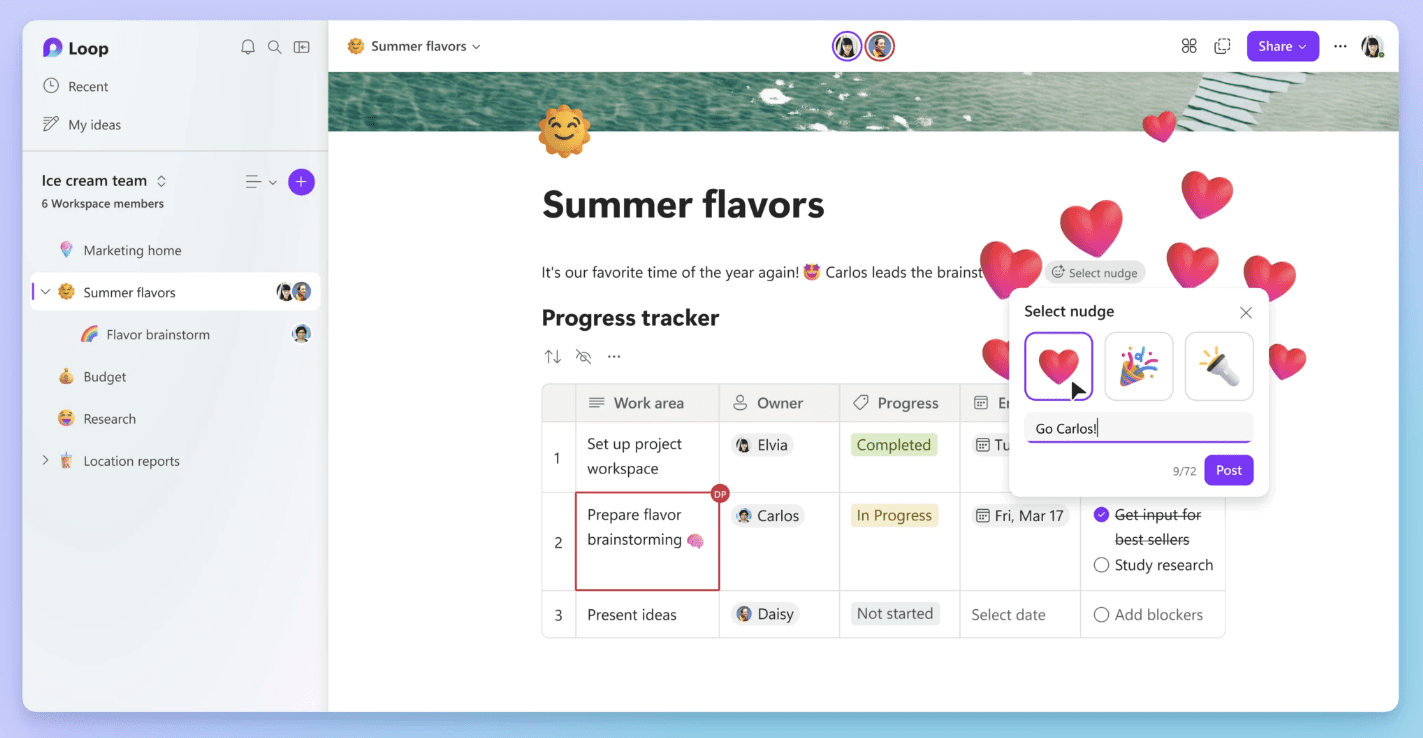
Microsoft Loop offers various features to help teams stay aligned and productive while working on dynamic projects. Progress trackers and custom labels are available to help keep workstreams organized. Tasks assigned within the Loop app and task list component automatically sync across Microsoft Planner and To Do, ensuring that everyone has the most up-to-date information on what needs to be done. In addition, team members can communicate with comments, nudges, reactions, and emojis to express themselves as they collaborate.
Get notified to stay in control

Notifications in Microsoft Loop allow for easy time and attention management, whether on desktop or mobile. The notification feed keeps track of mentions, assigned tasks, and replies, with the ability to quickly view and respond. Loop components have the same security and permission settings as Word, Excel, and PowerPoint, with clear visibility on who has access to pages and components. The Search function in the Loop app makes it easy to find what you need, with the option to set custom filters for even faster access.
Copilot in Loop
Microsoft 365 Copilot was recently introduced as a helpful tool for work. Copilot in Loop uses AI to assist collaboration by suggesting prompts like “create” or “brainstorm”. Users can also type in a prompt to receive assistance. Copilot in Loop allows for co-creation, with team members able to go back to earlier prompts, refine language, and edit responses for better, personalized results.

In the coming months, Microsoft Loop will be rolling out summarization capabilities powered by Copilot. With Copilot in Loop, you can quickly understand essential information by summarizing the content of a Loop page or documents linked in the workspace. The summaries can be edited to add more detail or context and shared with others as Loop components to keep everyone on the same page.
Microsoft has said that the public preview of the Loop app is now available. Users can start using it by visiting Microsoft Loop on the web. To download the mobile app, go to the Loop mobile app for Android and Loop iOS app. The mobile app is currently available for work accounts and will soon be available for personal accounts.
Image source credits: Microsoft
Read next: NVIDIA announces new services and partnerships to bring AI to all industries


